case study
TOYOTA.com
As the number one seller of new vehicles worldwide,
Toyota is persistently looking for ways to improve. This notion
of Kaizen, or persistent self improvement, provides a goal
for those who work on Toyota’s products.
Challenge
FACILITATE THE JOURNEY
In 2016 a number of signals surfaced to indicate that users were having a tough time
being matched to appropriate content on Toyota.com. As a UX Lead it was my goal
to dig in further and present solutions to solve wayfinding pain points and better
facilitate the user’s journey.
TUNING IN SIGNALS
Heat maps and engagement metrics from Saatchi and Saatchi’s analytics team
painted a picture of a dipping engagement throughout Toyota’s web experience.
Across the board, key pages were seeing common declines.
The majority of content below the fold was simply being ignored, with a few signals
indicating high value content was completely misplaced. These analytics were
reinforced by both a JD Power study and internal usability testing. This gave me
plenty of reason to holistically rethink wayfinding on toyota.com.
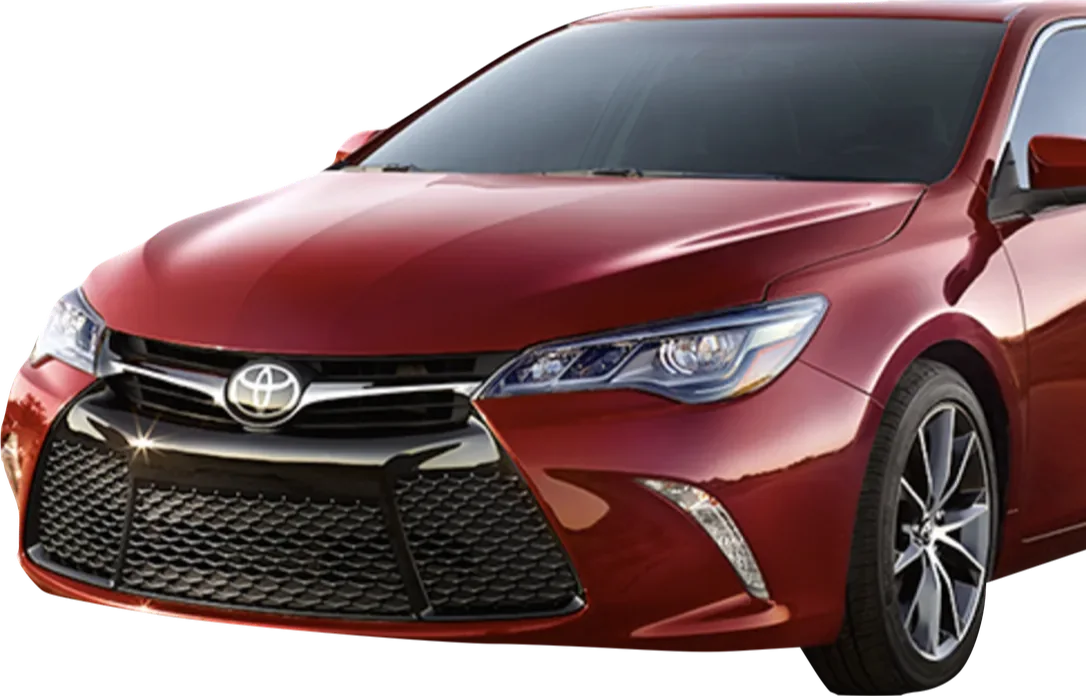
Toyota Camry Model Landing Page, January 2016
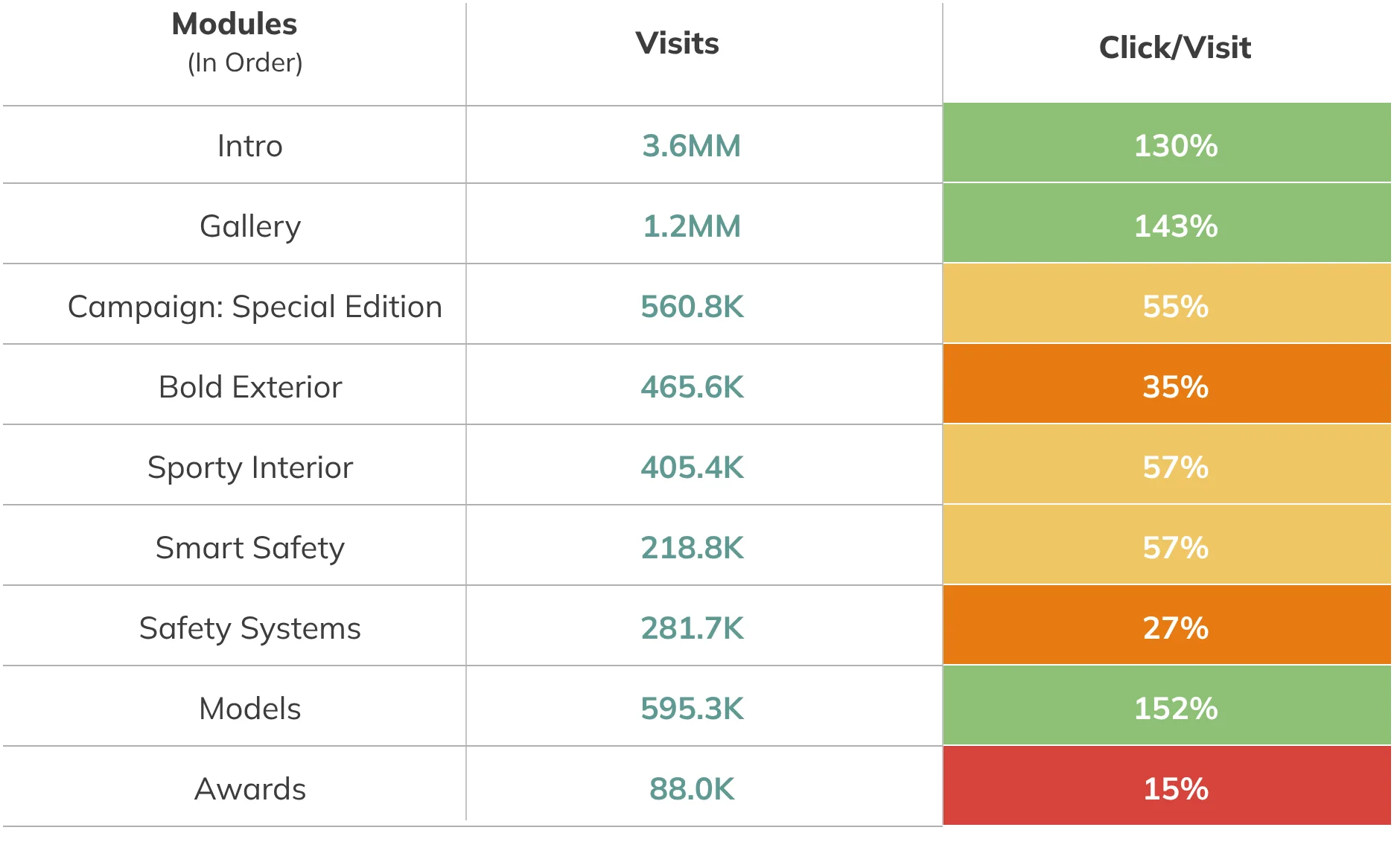
Above: Analytics showed clear signals that users wanted a faster way to view different models
Above: Usability tests showed that the navigation patterns on mobile were too ambiguous for many users.
LOOKING OUTWARD
Auto manufacturer sites share many similarities. Aside from brand loyalists,
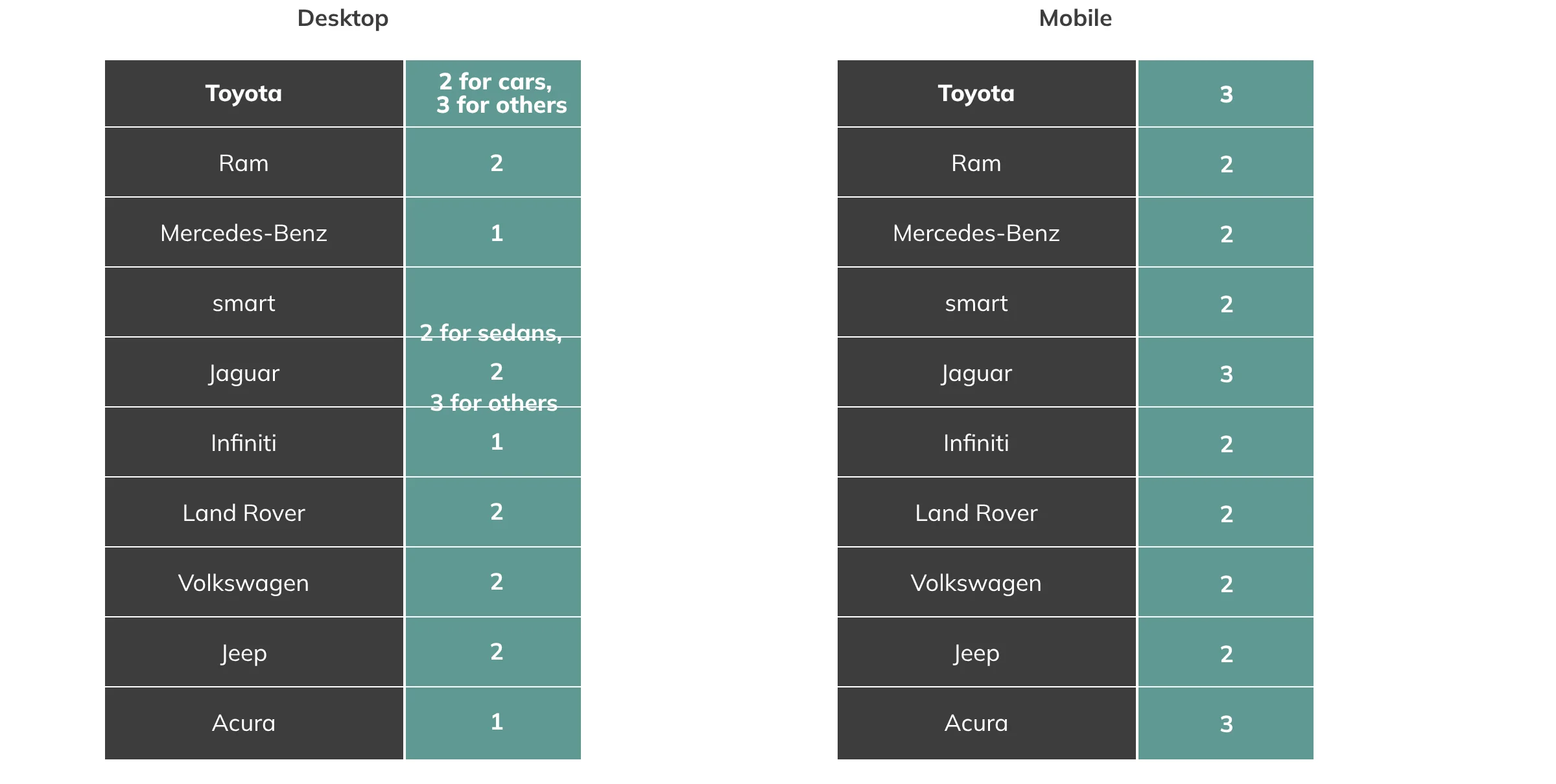
consumers typically cross shop multiple sites. I started with some competitive
benchmarking of navigation systems and found some key outliers for Toyota.
Clicks/Taps from Homepage to Model Landing Page
Since the mobile platform presented the biggest challenge, I also took a look at some
big brands and best in class experiences. I used four factors to evaluate sites:
Scannability, Scalability, Performance and Fun.
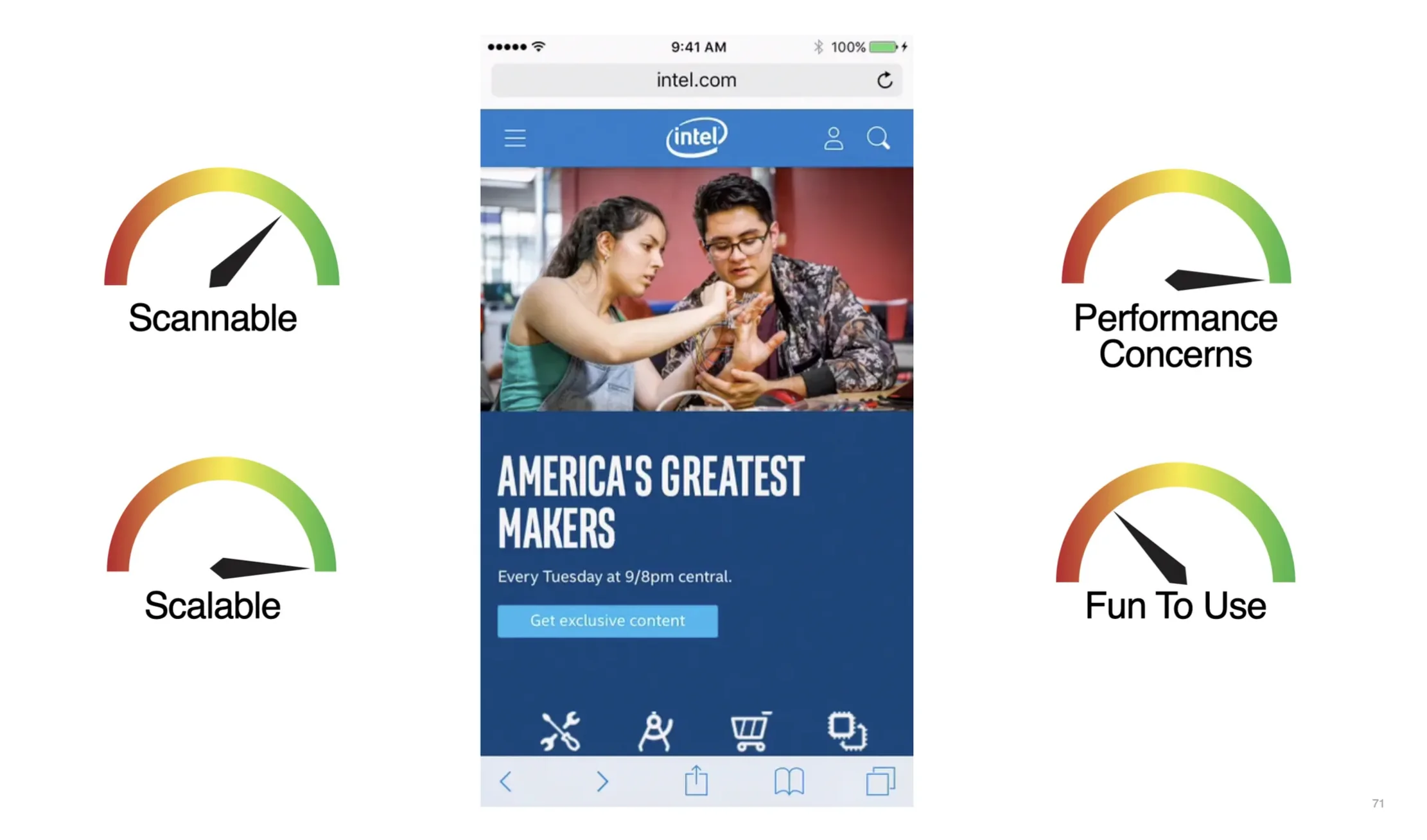
Above: Intel’s mobile menu is simple, easy to scan and easy to scale– but maybe not as engaging as some treatments.
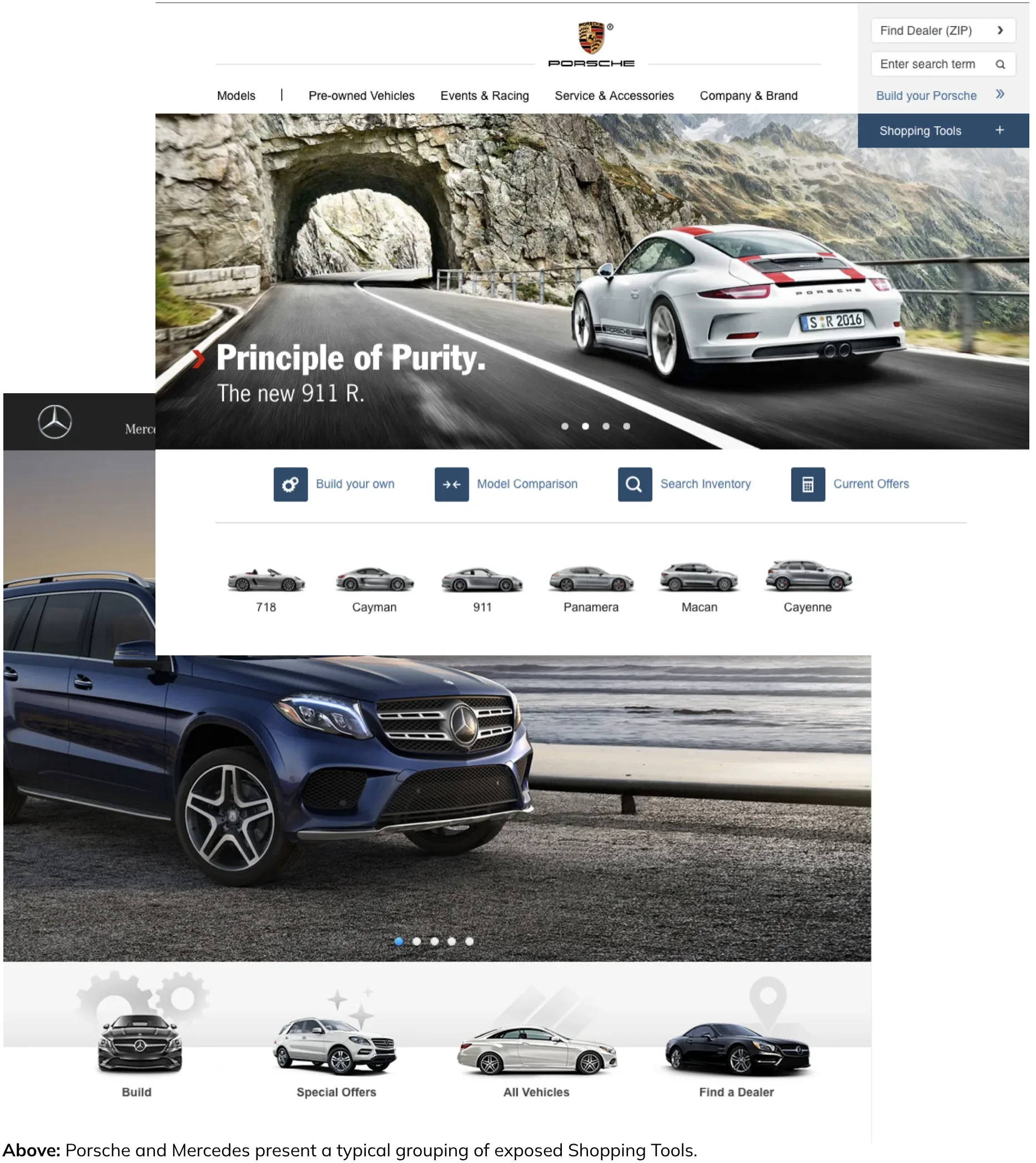
Something I quickly noticed on most auto manufacturer sites was the placement of
Shopping Tools. While Toyota typically had more links to present, they were hidden
behind clicks and taps. Many OEMs presented less Shopping Tools, but placed them
more obviously. Almost all sites lead with Build and Price.
Above: Toyota was utilizing important real estate for vehicle categories. Shopping Tools were accessible behind a link in the main nav.
To validate which Shopping Tools Toyota should bring forward, I took a look at the
metrics for top clicks within the Shopping Tools menu. I also was curious to take the
bias of placement out of the selection process for users. I used usertesting.com and
Optimal Sort to conduct an online card sorting exercise.
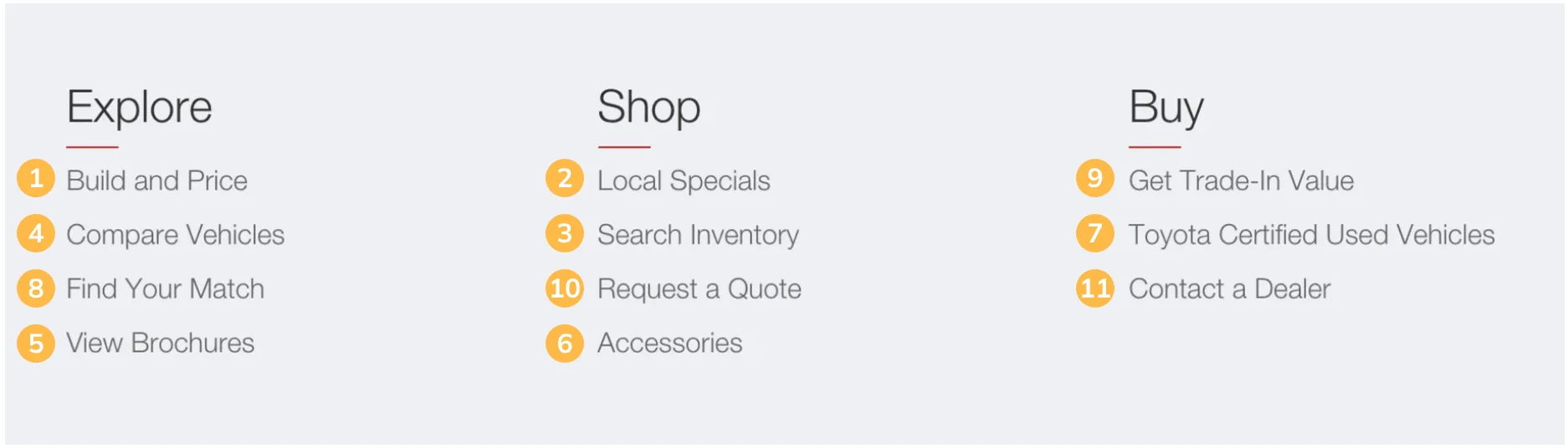
Above: Analytics showed the most popular links under Shopping Tools in the main navigation.

Above: Card sorting exercises results for the top 5 most sought after links in Shopping Tools.
TOP CONSIDERATIONS
From the Learning phase, I determined that there were three main areas that needed
attention in order to improve wayfinding on Toyota.com. Overall, users were not
able, or simply not patient enough to wade through multiple screen lengths of
content. Mobile navigation patterns weren’t as clear as they should be. High value
tools were getting lost behind clicks.
BUILDING BETTER MENUS
One of the most common goals for users on Toyota’s website is to view photos of
different models. The mobile menu needed to get users to the right model and trim
quickly. I experimented with transitions and animations to make these nested
selections easier. I also knew that in-page navigation needed to facilitate shorter,
more targeted screens.
Above left: One of several prototypes I created to utilized in page animations and transitions to make nested navigation easier.
Above right: This prototype shows a subnavigational menu to help user retain context and easily navigate to specialized screens
KEY LINKS, TOP LEVEL
Competitive analysis and analytics had made it pretty clear that locating key
Shopping Tools and quickly finding Model Detail Pages were at the top of user’s
wayfinding wants. Placing less emphasis on the Toyota’s news articles and
prominently placing links and navigational elements within the homepage became a
clear win for the user.
Above: The proposed layout for homepage placed less emphasis on News and made Models and certain Shopping Tools obvious.
BREAKING UP
Instead of long scroll pages I presented an idea to create Hub and Spoke model
pages for Toyota’s Model Landing Pages. This consisted of creating one main
Overview page and letting detailed screens nest utilizing a series of subscreens. Both
the navigation and page content needed to encourage users to easily scan for high
value content.
Above Left: The existing Gallery section on a Model Landing Page presented a complex interface with little context.
Above Right: Using a Hub and Spoke model gave an easier way to locate specific content without scrolling the entire gallery or wasting
experimental clicks.
Above: The Overview page was designed to both entice clicks and provide clear wayfinding.
PUTTING IT ALL TOGETHER
Once the design team felt comfortable with the information architecture and the content
plan for key screens we began to develop a prototype for key flows. Since the
navigational elements relied heavily on animations and screen transitions, we felt
strongly that stakeholder buy in would be accomplished using high fidelity prototypes.
This also gave us the opportunity to put robust experiences in front of users to test.
Above: A high fidelity prototype of Toyota’s homepage shows how users might locate Model Detail Pages quickly
CHECKING OUR WORK
After helping to construct a series of high fidelity prototypes, I reached out to a
recruitment company and a usability moderator to make sure we reduced as much
bias as possible for testing our experiences.
Over several days, participants walked through a series of tasks while a moderator
was able to extract as much detail as possible from stumbles and moments of joy.
Myself and the team learned a lot through this exercise. The feedback confirmed that
our overall structure was beneficial but many patterns and interactions needed work.
The team was able to present our usability findings to Toyota along with a series of
design changes. Overall, Toyota felt comfortable with our approach and decided to
invest in developing the proposed wayfinding changes.
Above: A usability participant runs through a prototype of the Toyota’s Model Detail Page
Above: Usability testing results were aggregated along with recommendations for the next design round
RESULT
Although I left for a new opportunity before development was complete, I can say
that many of the wayfinding changes lasted in Toyota’s experiences for a number of
years. Even today, five years later, the architecture of the Model Detail Page remains
intact. The Shopping Tools and Model navigation on the home page is what myself
and the team prototyped and designed!